


典型的 PHP Web 应用程序在登录之前通过询问用户的凭据(如用户名和密码)来验证用户。然后,根据服务器可用的用户数据检查凭据。在此示例中,用户数据以关联数组的形式提供。以下 PHP 登录脚本说明如下 -
HTML 表单
代码的 HTML 部分提供了一个简单的 HTML 表单,该表单接受用户名和密码,并将数据发布到自身。
<form action = "<?php echo htmlspecialchars($_SERVER['PHP_SELF']); ?>" method="post">
   <div>
      <label for="username">用户名:</label>
      <input type="text" name="username" id="name">
   </div>
   <div>
      <label for="password">密码:</label>
      <input type="password" name="password" id="password">
   </div>
   <section style="margin-left:2rem;">
      <button type="submit" name="login">登陆</button>
   </section>
</form>
PHP 身份验证
PHP 脚本解析 POST 数据,并检查用户名是否存在于 users 数组中。如果找到,它会进一步检查密码是否与数组中的注册用户相对应
<?php
   if (array_key_exists($user, $users)) {
      if ($users[$_POST['username']]==$_POST['password']) {
         $_SESSION['valid'] = true;
         $_SESSION['timeout'] = time();
         $_SESSION['username'] = $_POST['username'];
         $msg = "您输入了正确的用户名和密码";
      } else {
         $msg = "您输入了错误的密码";
      }
   } else {
      $msg = "您输入了错误的用户名";
   }
?>
用户名和相应的消息将添加到 $_SESSION 数组中。无论用户输入的凭据是否正确,都会提示用户相应的消息。
完整代码
这是完整的代码 -
Login.php
<?php
   ob_start();
   session_start();
?>
<html lang = "zh-cn">
<head>
   <meta charset="UTF-8">
   <meta name="viewport" content="width=device-width, initial-scale=1.0">
   <link rel="stylesheet" href="loginstyle.css">
   <title>登陆</title>
</head>
<body>
   <h2 style="margin-left:10rem; margin-top:5rem;">输入用户名和密码</h2>
   <?php
      $msg = '';
      $users = ['user'=>"test", "manager"=>"secret", "guest"=>"abc123"];

      if (isset($_POST['login']) && !empty($_POST['username'])
      && !empty($_POST['password'])) {
         $user=$_POST['username'];
         if (array_key_exists($user, $users)){
            if ($users[$_POST['username']]==$_POST['password']){
               $_SESSION['valid'] = true;
               $_SESSION['timeout'] = time();
               $_SESSION['username'] = $_POST['username'];
               $msg = "您输入了正确的用户名和密码";
            }
            else {
               $msg = "您输入了错误的密码";
            }
         }
         else {
            $msg = "您输入了错误的用户名";
         }
      }
   ?>

   <h4 style="margin-left:10rem; color:red;"><?php echo $msg; ?></h4>
   <br/><br/>
   <form action = "<?php echo htmlspecialchars($_SERVER['PHP_SELF']); ?>" method="post">
      <div>
         <label for="username">用户名:</label>
         <input type="text" name="username" id="name">
      </div>
      <div>
         <label for="password">密码:</label>
         <input type="password" name="password" id="password">
      </div>
      <section style="margin-left:2rem;">
         <button type="submit" name="login">登陆</button>
      </section>
   </form>

   <p style="margin-left: 2rem;">
      <a href = "logout.php" tite = "Logout">单击此处清除Session.</a>
   </p>
   </div>
</body>
</html>
Logout.php
<?php
   session_start();
   unset($_SESSION["username"]);
   unset($_SESSION["password"]);

   echo '<h4>你已清除 session</h4>';
   header('Refresh: 2; URL = login.php');
?>
要注销,用户单击链接即可 logout.php
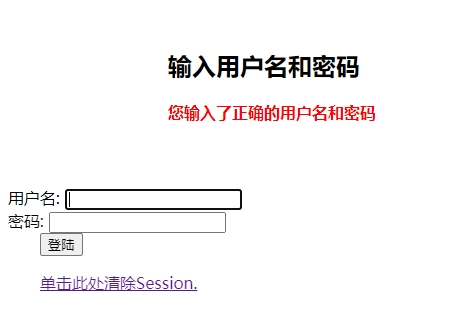
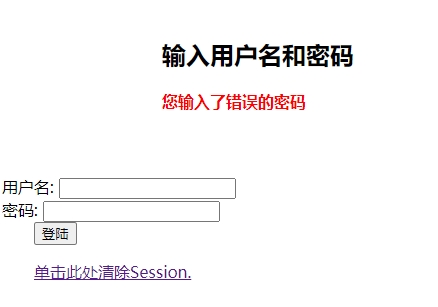
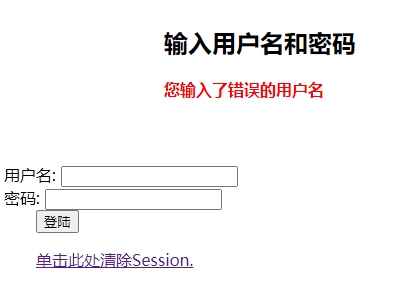
输入 “http://localhost/login.php” 启动应用程序。以下是不同的情况 -
正确的用户名和密码
密码错误
用户名不正确
当用户单击底部的链接时,会话变量将被删除,并且登录屏幕会重新出现。
